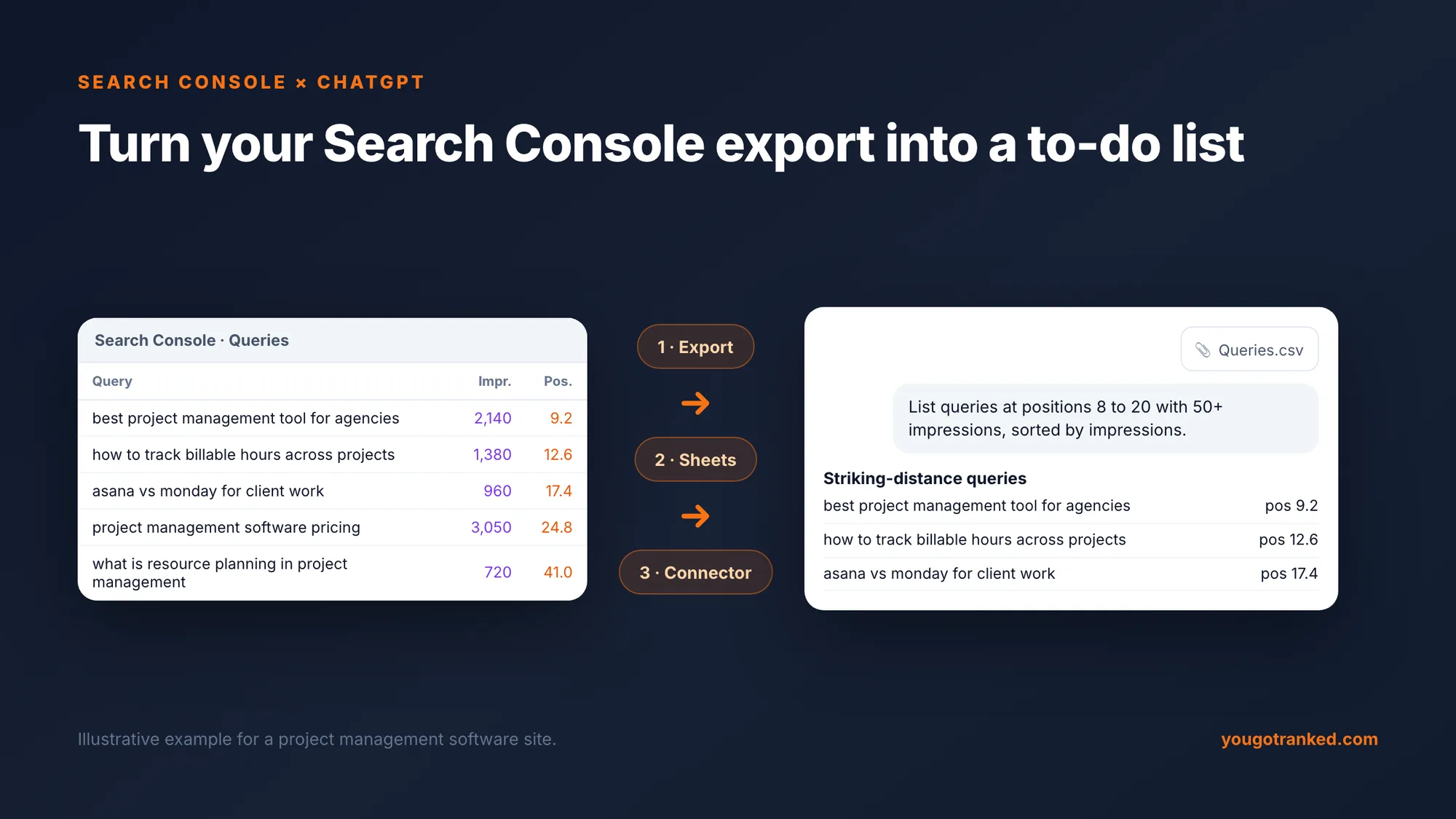
There is no built-in integration between Google Search Console and ChatGPT, but you can connect them three ways: export your Search Console data and upload the file, sync it to Google Sheets and attach the sheet, or connect a Search Console connector to ChatGPT where your plan supports custom connectors. The export route works on any plan with file uploads and takes about two minutes. This guide walks through each route with screenshots, then gives you the prompts, filters and method that turn the data into decisions.
Key takeaways
- 1Three routes, one recommendation. Export and upload for one-off analysis; Google Sheets for depth and monthly reporting; a connector for teams asking every week.
- 2The interface export stops at 1,000 rows. Filter with regex before you export to get past it, or pull through the API into Sheets.
- 3Ask for tables, not summaries. ChatGPT is good at filtering and grouping a file and unreliable at inventing numbers. Every prompt below returns something you can check.
- 4Long question queries are the bridge to AI search. They are the closest thing in Search Console to how people prompt assistants, and the raw material for an AI tracking set.
- 5Search Console cannot see ChatGPT. It now reports Google AI-feature impressions in beta, but nothing about what other assistants say. That needs its own measurement.
Terms in this piece
New to the acronyms? Each term below links to our field guide with plain-English definitions and how YouGotRanked scores them.
Before you start: what Search Console gives you
Search Console's Performance report is the only first-party record of how Google shows your site. Four metrics, five dimensions, up to 16 months of history.
| Metric | What it means | What ChatGPT can do with it |
|---|---|---|
| Clicks | Visits from Google search results | Rank queries and pages by value |
| Impressions | Times a link to your site was shown | Find demand you are not converting |
| CTR | Clicks divided by impressions | Spot titles and snippets that underperform |
| Position | Average highest position when shown | Find queries close to page one |
The dimensions are queries, pages, countries, devices and dates, plus search appearance. One catch shapes everything that follows: the standard export gives you a queries table and a pages table separately, so it does not tell you which page ranked for which query. Method 2 fixes that.
A note on privacy before you upload anything. Search Console data contains no personal information, but it is commercially sensitive, and uploading it shares it with a third-party service. Check your company's policy and your ChatGPT plan's data controls first, and get the client's agreement before uploading a client property.
Method 1: export and upload (any plan, two minutes)
This is the route we recommend for most people, because it needs nothing but Search Console and a ChatGPT plan that accepts file uploads.
- In Search Console, open Performance → Search results.
- Set the date range. Last 3 months is the best default; use 16 months if you want trends.
- Leave all four metrics on: clicks, impressions, CTR and average position.
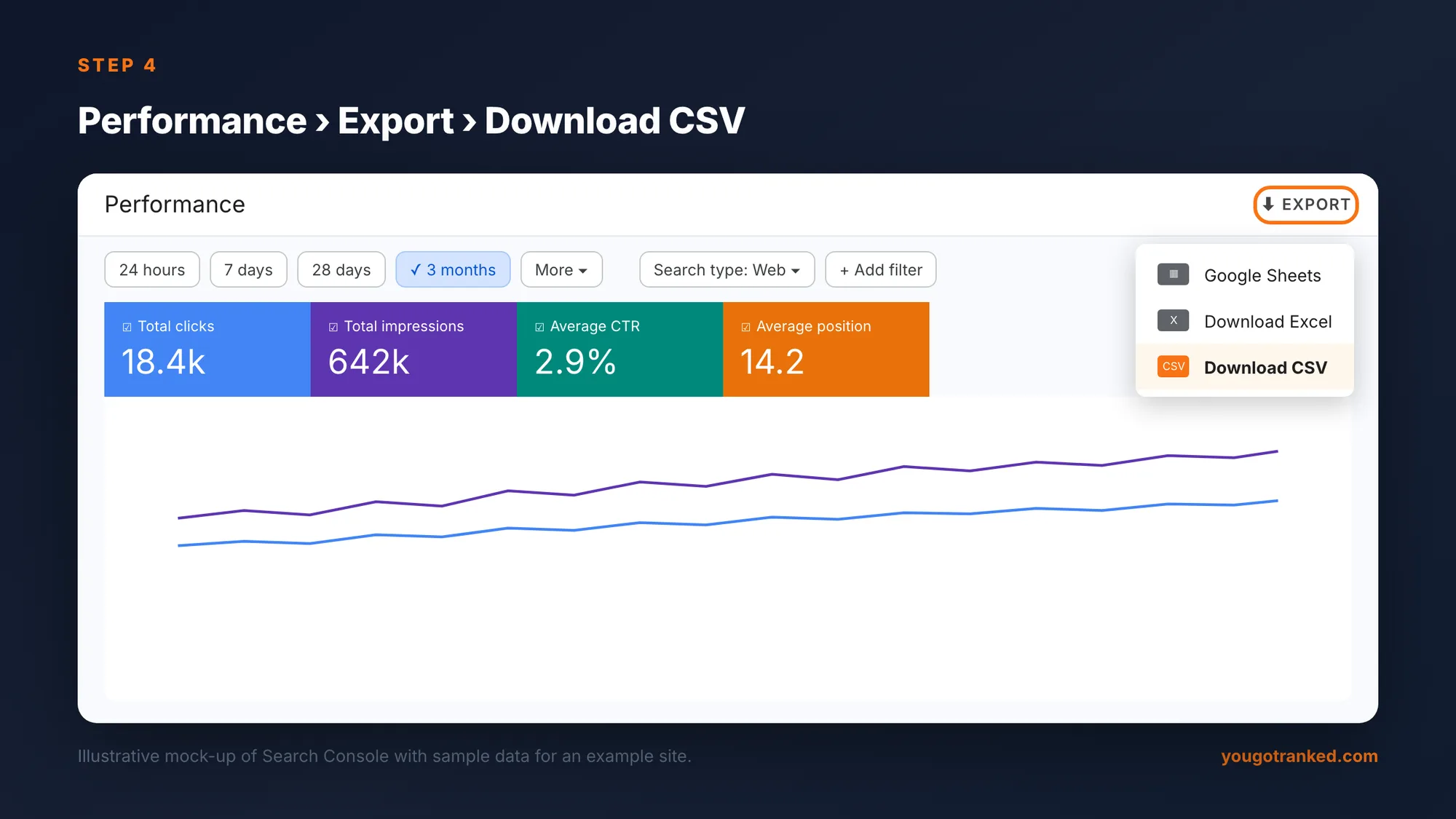
- Click Export at the top right and choose Download CSV (or Excel, or Google Sheets).
- Unzip the file. You get one file per tab of the report:
| File | Contains | Upload it? |
|---|---|---|
| Queries.csv | Top queries with clicks, impressions, CTR, position | Yes, always |
| Pages.csv | Top pages with the same metrics | Yes |
| Countries.csv, Devices.csv | Breakdowns by market and device | Only if relevant |
| Dates.csv | Daily totals | For trend questions |
| Filters.csv | The filters you exported with | No |
- Upload Queries.csv and Pages.csv to ChatGPT, then use the prompts below.
Get past the 1,000-row limit with regex
The Search Console interface exports at most 1,000 rows per table, ordered by clicks. For most sites that is enough, but it cuts off exactly the part you most want: the long tail of low-click, high-intent queries.
The workaround is to filter before you export. Search Console accepts regular expressions in the query filter, so you can pull slices of the long tail one at a time, each with its own 1,000 rows.
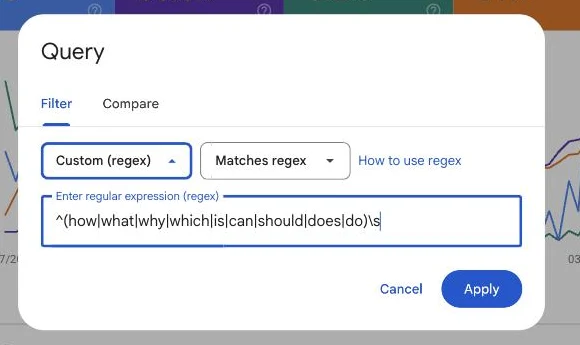
- Click Add filter → Query.
- Change "Queries containing" to Custom (regex).
- Paste a pattern and click Apply, then export.
Patterns worth keeping:
| You want | Regex |
|---|---|
| Question-led queries | ^(how|what|why|which|is|can|should|does|do)\s |
| Long queries (six words or more) | ^(\S+\s){5,}\S+$ |
| Comparison queries | \b(vs|versus|alternative|alternatives|compare|or)\b |
| Buying-intent queries | \b(best|top|pricing|price|cost|review|reviews)\b |
| Exclude your brand | Use Doesn't match regex with your brand name and misspellings |
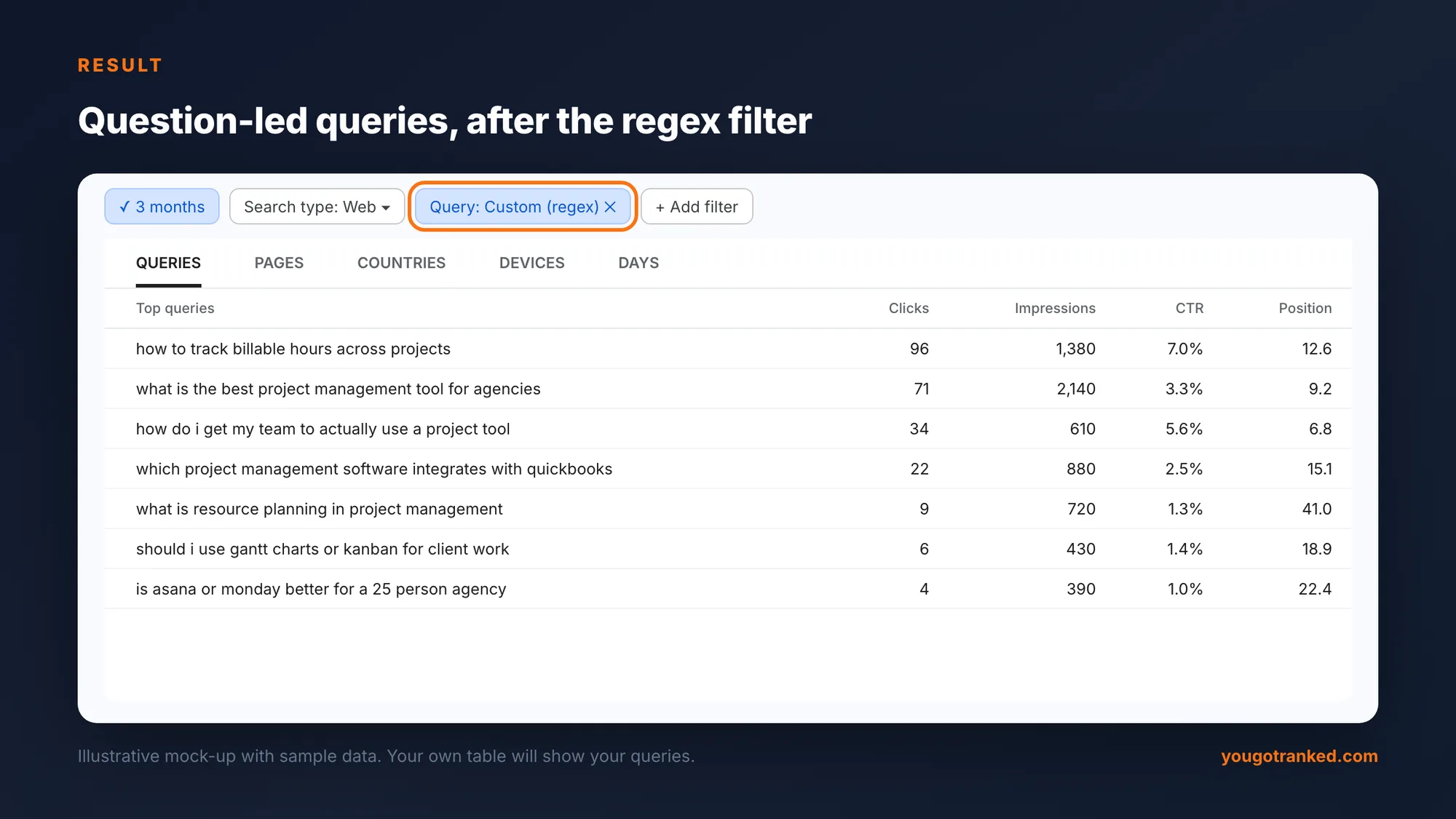
Applied to our own site, the question filter returns this, sorted by clicks:
Method 2: Google Sheets, for more rows and fresh data
The Search Console API returns far more rows than the interface export, and it can return query and page together, which the interface cannot. A Sheets add-on lets you use it without code.
- In Google Sheets, open Extensions → Add-ons → Get add-ons and install a Search Console add-on such as Search Analytics for Sheets.
- Choose your property, date range, and group by Query and Page together.
- Set the row limit to what you need (thousands of rows are fine), and schedule a monthly backup if the add-on supports it.
- Attach the sheet to ChatGPT through the Google Drive connector, or download it as CSV and upload.
Two advantages make this worth the extra 15 minutes. Depth: thousands of query rows rather than 1,000, which is where most long-form opportunities live. And query-to-page pairs, which make the cannibalisation prompt below exact rather than a guess. Refresh the same sheet each month and your analysis compares like with like.
Looker Studio can do the same job if your team already lives there: connect the Search Console data source, build a table of query, page and the four metrics, and export it.
Method 3: a Search Console connector (for teams)
ChatGPT supports connectors that let it query an outside service during a conversation. On plans that allow custom connectors, a Search Console connector built on the Model Context Protocol (MCP) lets ChatGPT pull your Search Console data itself, read-only, when you ask a question, without anyone exporting a file.
It is the most convenient setup once it is running, and the most demanding to set up. Before you approve one, check four things:
- Who built it. A connector is code that holds a token to your Search Console. Prefer one your team runs, or a vendor you already trust.
- Scope. It should request read-only Search Console access and nothing else.
- Admin approval. On business plans, a workspace admin usually has to enable custom connectors.
- Which properties. Grant access only to the properties the team needs.
For a one-off analysis, Method 1 gets the same answers faster.
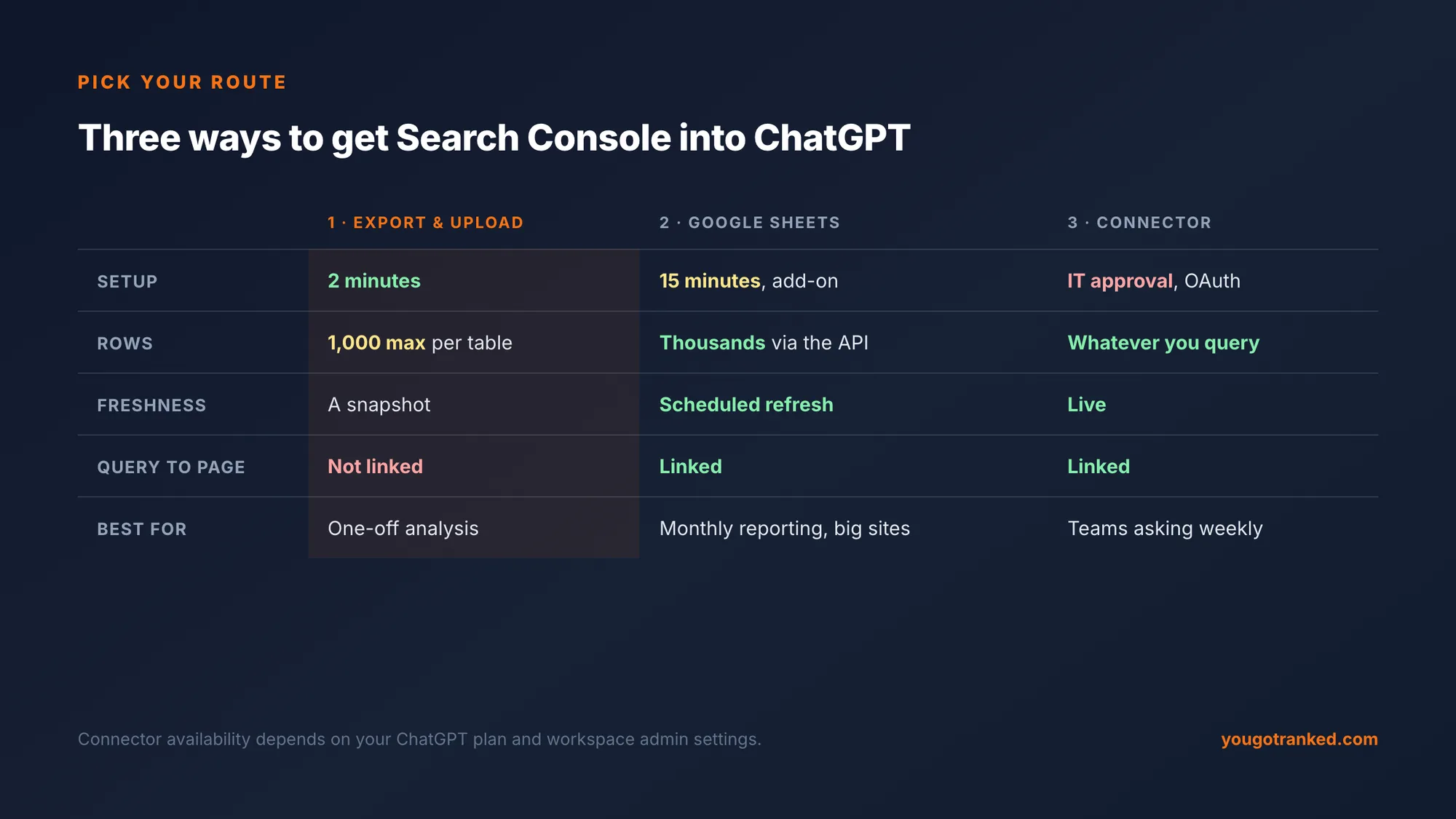
If
You need answers this afternoon
Start with
Method 1: export
Two minutes, any plan with uploads. Filter with regex first if you need the long tail.
If
You report every month
Start with
Method 2: Sheets
A scheduled sheet gives depth and a stable baseline, with query and page linked.
If
Your site has more than 1,000 meaningful queries
Start with
Method 2: Sheets
The API returns thousands of rows; the interface stops at 1,000.
If
Several people ask Search Console questions weekly
Start with
Method 3: connector
Live, no exports, once IT has approved it and scoped it read-only.
Six prompts that find real opportunities
ChatGPT is good at filtering, grouping and ranking a table; it is unreliable at inventing numbers. These prompts keep it doing the first and away from the second. Each asks for a table you can verify against the file.
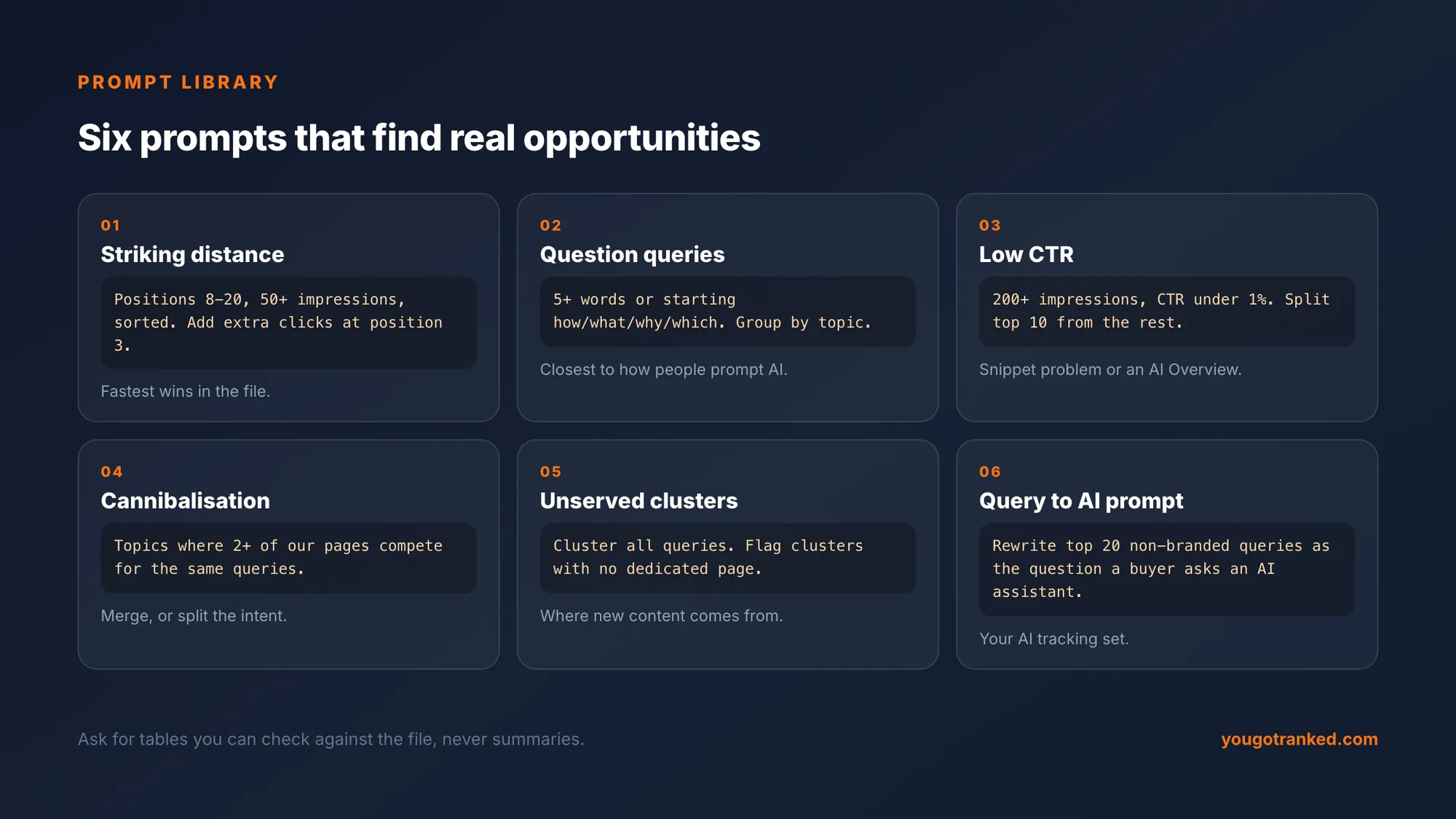
1. Striking-distance queries. The highest-return list in the file.
From Queries.csv, list queries with average position between 8 and 20 and at least 50 impressions, sorted by impressions. For each, estimate extra monthly clicks if it reached position 3, assuming a 10% CTR at position 3. Show your arithmetic in a column.
Queries already on page one or two move fastest, usually with a better title, a direct answer near the top of the page, and two or three internal links.
2. Long-form question queries. The bridge to AI search.
List every query of five or more words, or that starts with how, what, why, which, is, can or should. Group them by topic and give total impressions and best position per group.
These are the queries closest to how people prompt AI assistants, and the clearest signal of the questions your content should answer outright, in the first two sentences of a section.
3. High impressions, near-zero CTR.
List queries with over 200 impressions and CTR under 1%, with position. Separate those in positions 1 to 10 from those below 10.
A low CTR on page one usually means a title or snippet problem, or an AI Overview absorbing the click. A low CTR below position 10 is just ranking. The fixes are different, so the split matters.
4. Cannibalisation.
Using the query and page columns, identify queries where two or more of our pages receive impressions. List the query, the pages, and each page's impressions and position.
With the Sheets method this is exact. With the interface export, ask ChatGPT to flag likely overlaps by topic and confirm each one in Search Console by filtering on the query and opening the Pages tab.
5. Topic clusters with no dedicated page.
Group all queries into topic clusters. For each cluster give total impressions, best position, and the page that most likely ranks for it. Flag clusters where no page appears to target the topic directly.
This is where new content should come from: demand Google already associates with your site, with no page written for it.
6. Query to AI prompt.
For the 20 highest-impression non-branded queries, write the question a buyer would ask an AI assistant instead. Write each as a full sentence, include the buyer's likely context (team size, budget, use case), and do not mention our brand.
The output is the start of an AI tracking set. More on this below.
What this looks like on a real site
We ran this exact process on our own Search Console export before writing this guide.
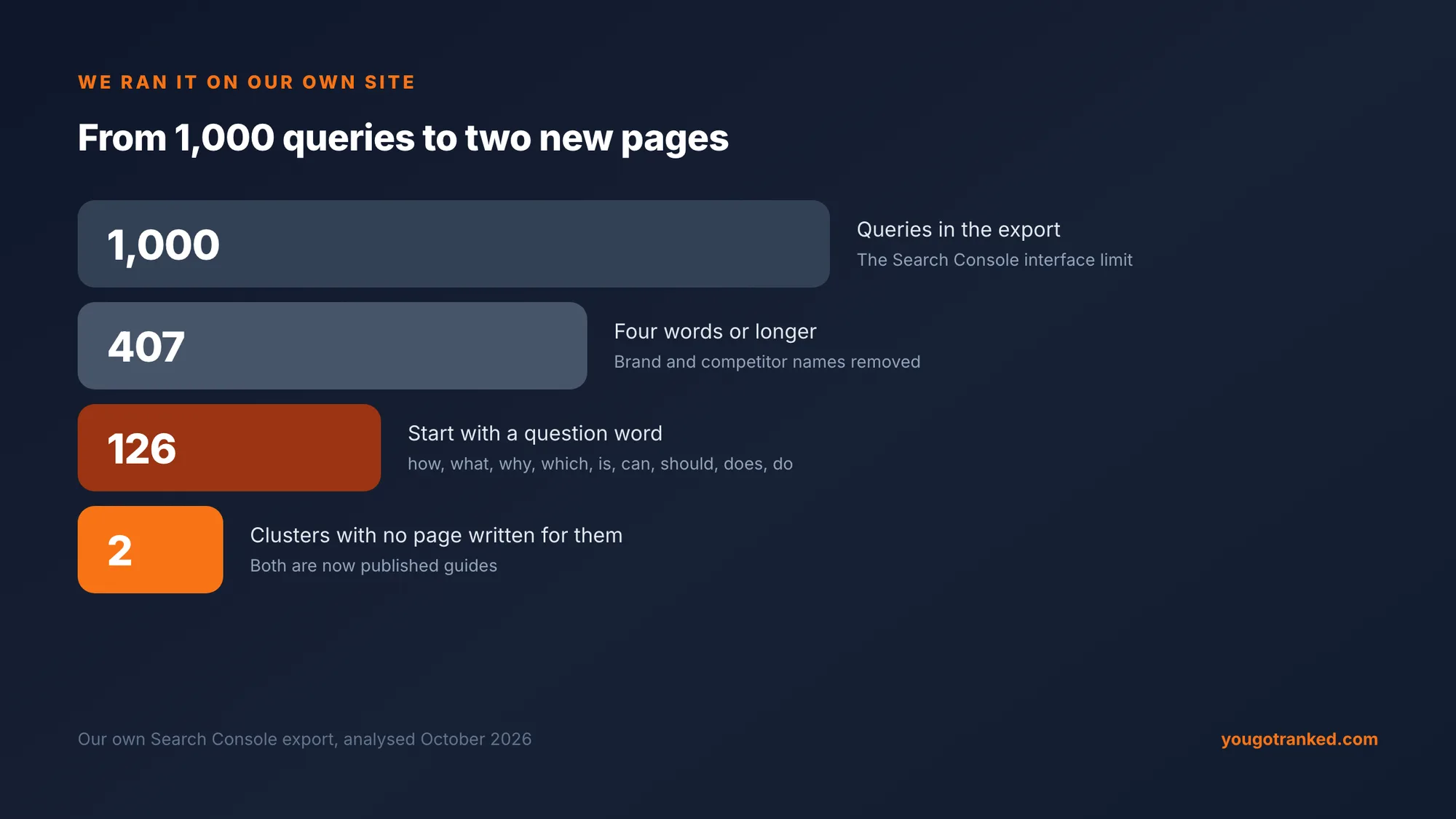
Two findings came straight out of prompts 2 and 5. A question-shaped query, "how do I prove ROI from GEO to leadership", already sat at position 4.4 with no page written for it; that became a dedicated guide. And a cluster around connecting Search Console to ChatGPT carried steady impressions at positions 30 to 77, served by a page about a different question. That became this one.
Three other things stood out, and they are typical. Several queries were 20 to 40 words long, written as instructions to an assistant rather than searches, which suggests AI agents are now running Google searches on users' behalf. A handful of queries named competitors in comparisons we had not written about. And our highest-impression query, "generative engine optimization", sat at position 68: real demand, but a page-one fight for another quarter, not a quick win.
Google's new Generative AI report in Search Console
Search Console now includes a beta Generative AI features report. Open Performance, look for "Get more details on your site's performance in generative AI features on Google Search", and click Open report.
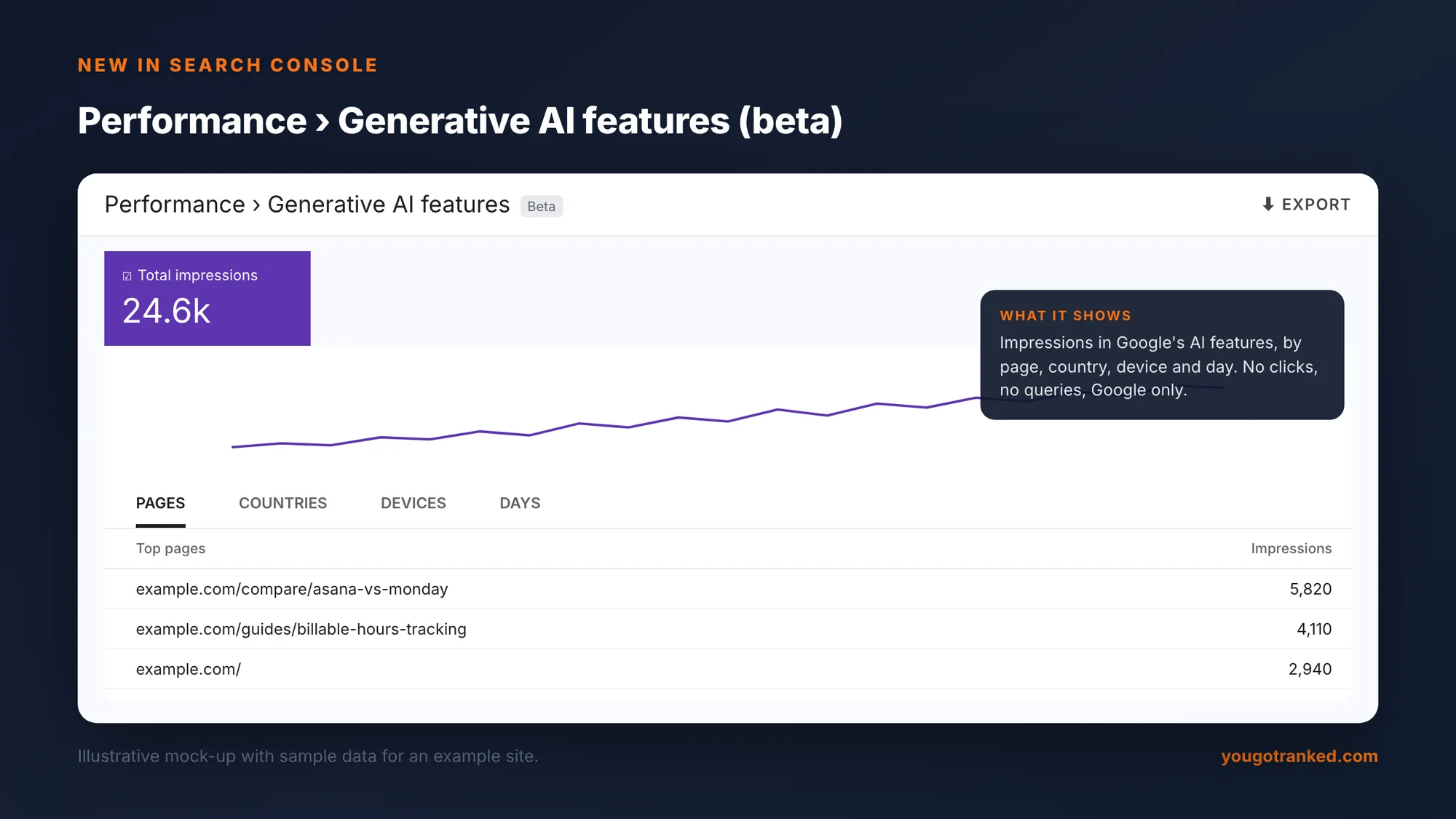
What it shows: impressions your pages earned in Google's generative AI features, broken down by page, country, device and day. What it does not show: clicks, the queries that triggered them, or anything outside Google. It exports like the main report, so you can upload it to ChatGPT alongside Pages.csv and ask a useful question:
Compare GenerativeAI_Pages.csv with Pages.csv. List pages with high AI-feature impressions but low organic clicks, and pages with strong organic clicks but no AI-feature impressions.
The first group is being used by Google's AI features without sending traffic; the second ranks well but is not being quoted. For our site, a comparison page we had written for a reader question was the single most-shown page in Google's AI features, ahead of the home page, which is a strong hint about which formats the AI features prefer.
How to turn Search Console keywords into AI prompts
Search Console tells you how people search Google. AI assistants are asked differently: longer, conversational, often with context about who is asking and what they need. To track whether assistants recommend you, convert your best queries into the prompts a buyer would actually type.
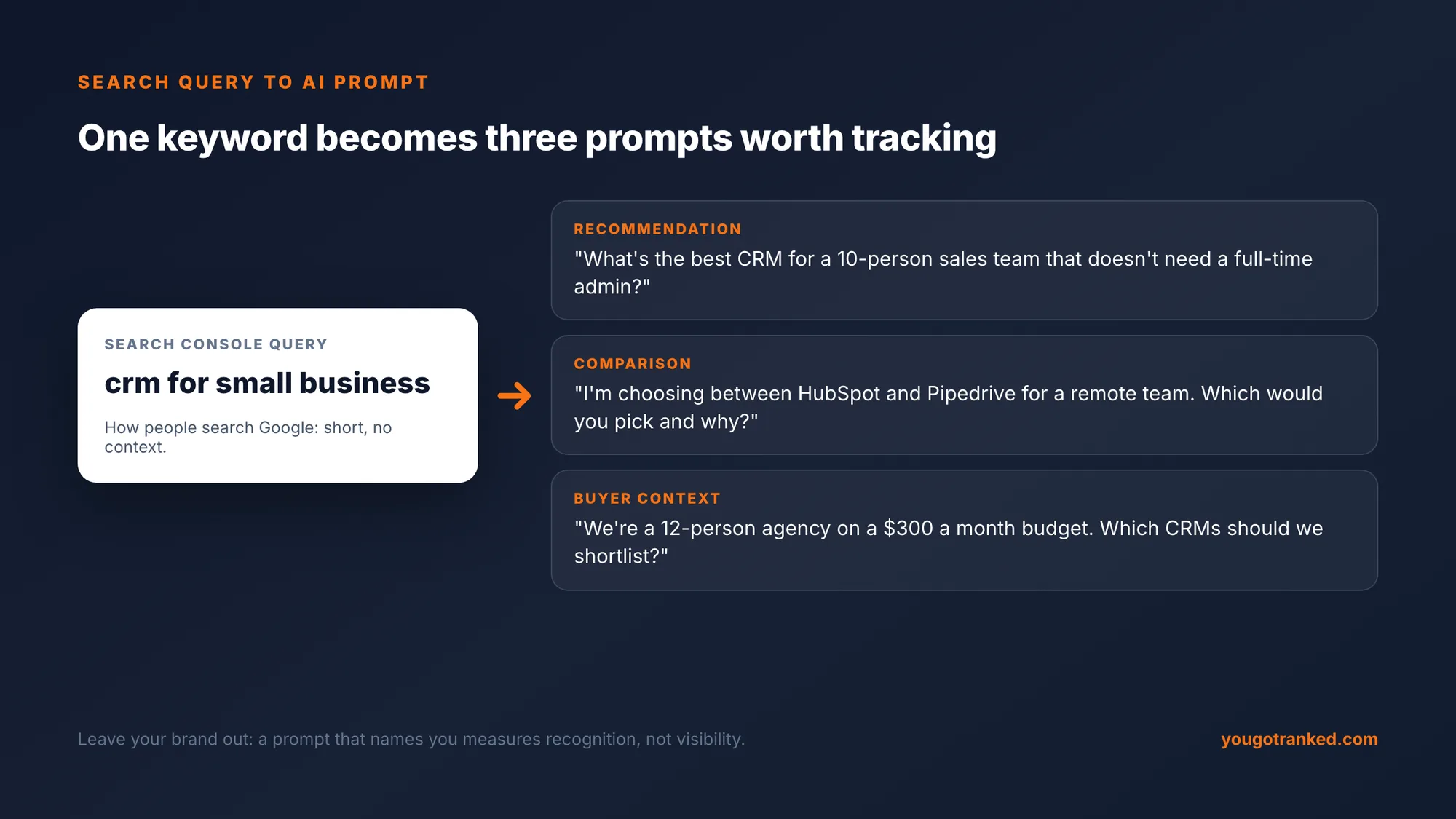
Take each high-value query and rewrite it three ways:
| Prompt type | Template | Example from "project management software pricing" |
|---|---|---|
| Recommendation | What's the best [category] for [who] that [constraint]? | What's the best project management tool for a 25-person agency that doesn't need a dedicated admin? |
| Comparison | I'm choosing between [A] and [B] for [use case]. Which would you pick and why? | I'm choosing between Asana and Monday for client work. Which would you pick and why? |
| Buyer context | We're a [size] [type] on a [budget]. Which [category] should we shortlist? | We're a 25-person agency on $500 a month. Which project management tools should we shortlist? |
Leaving your brand out is the important part. A prompt that names you will almost always return you, so it measures recognition. The useful question is whether assistants recommend you when the buyer does not know you yet. Keep the set fixed once you start tracking it, so a change in the result means your visibility moved, not the questions. (Why that matters for reporting is covered in How to Prove GEO ROI to Leadership.)
What ChatGPT cannot tell you from Search Console
Connecting the two gives you a fast analyst for your Google data. It does not tell you what ChatGPT, Gemini, Perplexity or Google's AI Overview say about your brand when buyers ask them, because Search Console measures Google, and the other assistants never pass you the prompt at all. We covered why in There Is No Search Console for AI Prompts.
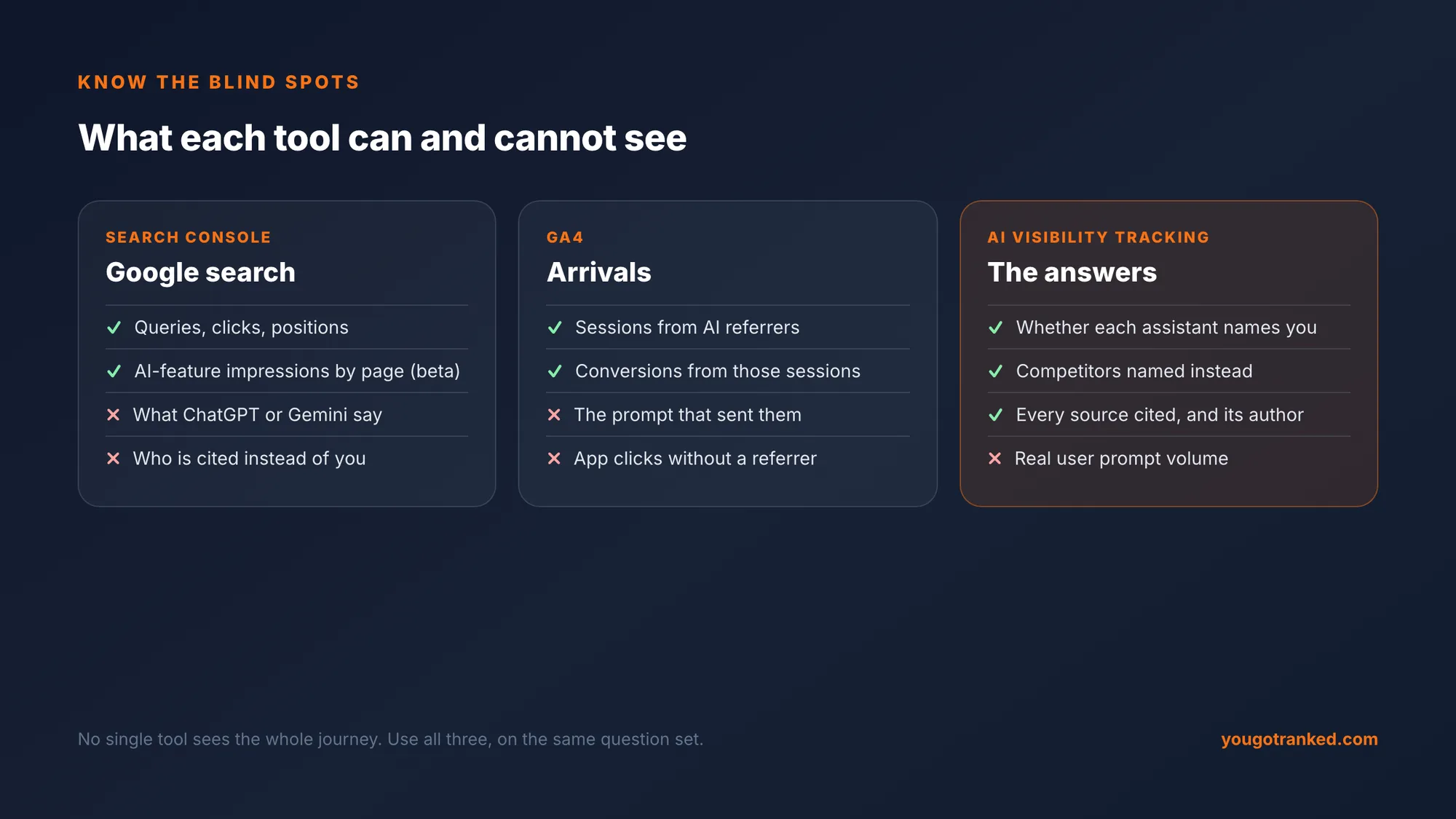
That is the gap the keyword-to-prompt step points at. Once you have the prompts, the measurement is: run them across the AI assistants on a schedule, record whether you are named and who is named instead, and log which sources each answer was built from. Doing that by hand works for a handful of prompts and a week or two. Across dozens of prompts, several engines and months of trend, it needs a tool.
Common mistakes
- Trusting a summary. Ask for a table every time, and spot-check three rows against the file.
- Analysing 1,000 rows and calling it the long tail. It is the head. Filter with regex or use the API.
- Mixing branded and non-branded queries. Your brand terms dominate clicks and hide everything else. Exclude them with "Doesn't match regex".
- Comparing different date ranges. Month-on-month analysis needs identical ranges and the same filters.
- Chasing the biggest number. A 12,000-impression query at position 68 is a quarter-long project. A 150-impression query at position 10 is this week's win.
- Uploading a client's data without asking. It is their commercially sensitive data, not yours.
Framework
A 30-minute monthly routine
Export the last 3 months, with a regex filter for question-led queries as a second export.
Run prompts 1, 2 and 5. Pick three striking-distance queries and one unserved cluster.
Check the Generative AI report: which pages Google's AI features used, and which strong pages they ignored.
Convert any new high-value queries into AI prompts and add them to your tracking set, dated.
Search Console and AI visibility in one place
YouGotRanked runs a fixed set of buyer prompts across ChatGPT and other AI providers, shows every source behind every answer, and connects Search Console so your content plan starts with the queries you already rank 8 to 20 for. Start with a free analysis.
Analyze My Brand for Free →
FAQ
Can you connect Google Search Console to ChatGPT? Not natively, but there are three reliable ways. Export your Search Console performance data as CSV and upload it; sync it to Google Sheets and attach the sheet through the Google Drive connector; or, on plans that support custom connectors, connect a Search Console connector so ChatGPT can query your data directly.
How do I export Search Console data for ChatGPT? In Search Console go to Performance, then Search results, set the date range, keep clicks, impressions, CTR and position selected, click Export and choose Download CSV. Upload the Queries and Pages files to ChatGPT. The interface export is capped at 1,000 rows per table.
How do I get more than 1,000 rows out of Search Console? Either filter before exporting, using Add filter, Query, Custom (regex) to pull slices such as question-led or long queries, each with its own 1,000 rows, or use the Search Console API through a Google Sheets add-on, which returns thousands of rows and links queries to pages.
What should I ask ChatGPT about my Search Console data? Start with striking-distance queries (positions 8 to 20 with meaningful impressions), long-form question queries, high-impression queries with low CTR, cannibalisation between pages, topic clusters with no dedicated page, and rewriting top queries as AI prompts. Ask for tables you can check against the file rather than summaries.
How do I turn Search Console keywords into AI prompts? Rewrite each high-value query as the full question a buyer would ask an AI assistant: a recommendation request, a comparison, or the query with the buyer's context added. Leave your brand name out, so the prompt measures whether assistants recommend you to people who do not know you yet.
Does Search Console show AI Overview or ChatGPT performance? Search Console reports Google only. AI Overview impressions and clicks are counted within its web search totals, and a beta Generative AI features report now shows impressions in Google's AI features by page, but none of it covers ChatGPT or other assistants.
Is it safe to upload Search Console data to ChatGPT? Search Console data is not personal data, but it is commercially sensitive, and uploading it shares it with a third-party service. Check your company's data policy and your ChatGPT plan's data controls first, and get the client's agreement before uploading a client property.
What is a good regex for question queries in Search Console? Use ^(how|what|why|which|is|can|should|does|do)\s with Custom (regex) and Matches regex. It keeps queries that start with a question word followed by a space, which are the queries closest to how people ask AI assistants.
Go deeper: How to Prove GEO ROI to Leadership · There Is No Search Console for AI Prompts · What Is AI Search Visibility? · How to Get Your Brand Into a Google AI Overview